

Attendance
How to Create a Fair Work Schedule Policy for a Small Business
Jun 25, 2026 · 5 min read
Scheduling starts simple. You tell people their shift in chat, write changes on a whiteboard, and remind everyone the night before.
Then the team grows.
Someone swaps shifts without telling the manager. Someone arrives late because they saw the old schedule. Someone works extra hours and expects overtime. Someone files leave after the schedule was already posted. Payroll day arrives and the owner has to decide which version of the schedule is "real."
A clear scheduling policy prevents that mess.
Define normal work schedules
Start with the basic shift patterns your business uses.
For example:
- Opening shift: 8:00 AM to 5:00 PM
- Closing shift: 1:00 PM to 10:00 PM
- Part-time shift: 5:00 PM to 9:00 PM
- Night shift: 10:00 PM to 6:00 AM
Each schedule should define the start time, end time, break duration, and expected workdays. If your business has different rules for daily, hourly, or fixed-monthly employees, write those down too.
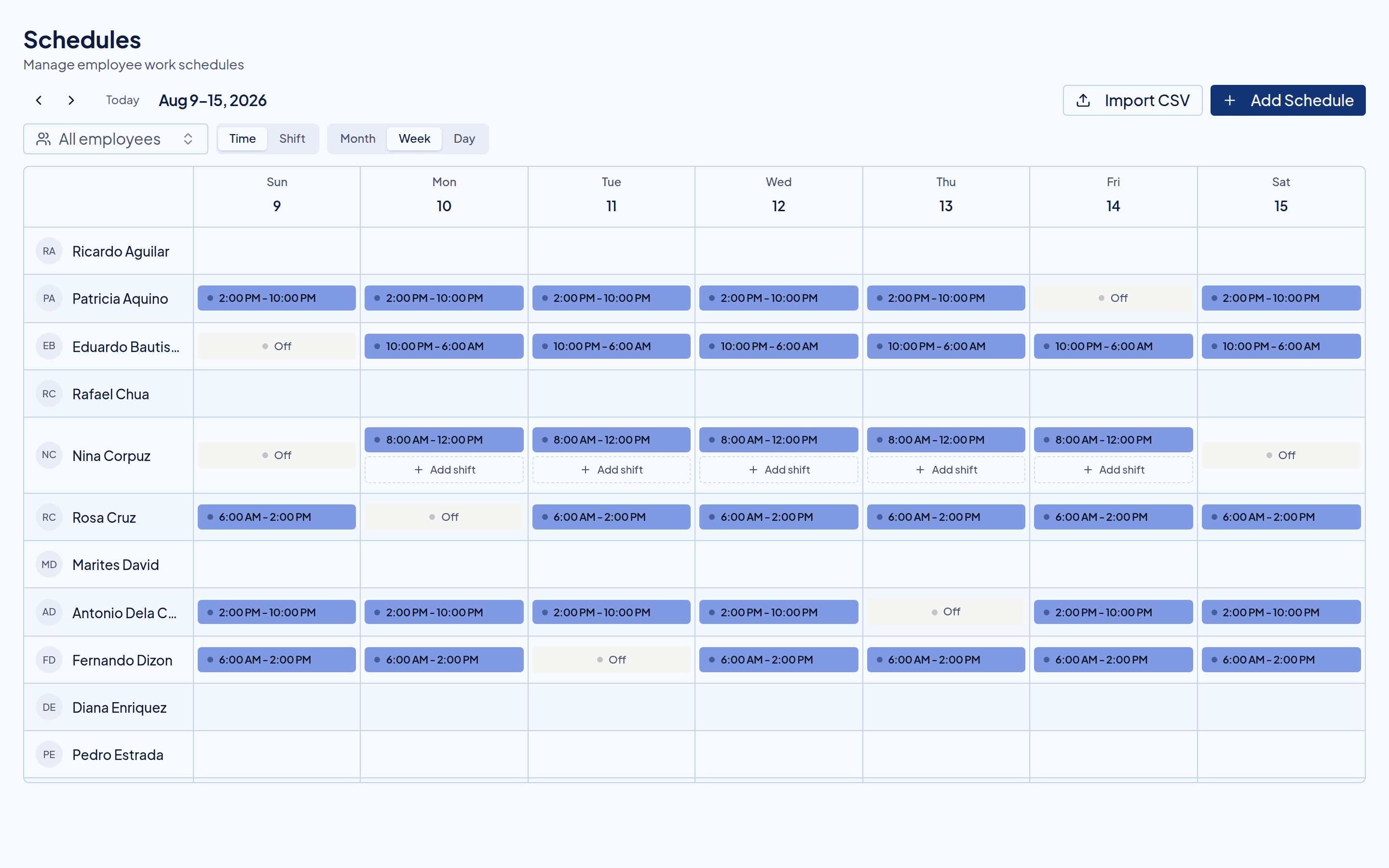
In Timekeep, you can create shift templates and assign schedules to employees over date ranges.
Set rest days clearly
Rest days should not be handled casually. Employees need to know which days they are expected to work and which days they are not.
Your policy should answer:
- How many rest days are normally assigned?
- Who approves rest day changes?
- How much notice is needed?
- What happens if someone works on a rest day?
- How are rest day and holiday combinations reviewed?
Rest day work can affect payroll, especially when overtime or holidays are involved. Keep the schedule record clean before payroll runs.
Decide how schedule changes happen
Schedule changes are normal. The policy should say how they are requested and approved.
For example:
- Employees request schedule changes through the manager.
- Managers must approve changes before the shift starts.
- Same-day changes require a documented reason.
- Schedule swaps are not valid until approved.
- Payroll follows the approved schedule in the system.
This avoids the common problem where one employee relies on a chat message, another relies on the posted schedule, and the payroll processor has to decide later.
Publish schedules before the workweek
Employees should see their schedules early enough to plan.
For many small businesses, publishing weekly schedules is enough. For operations with stable staffing, monthly schedules may work better. The important thing is consistency.
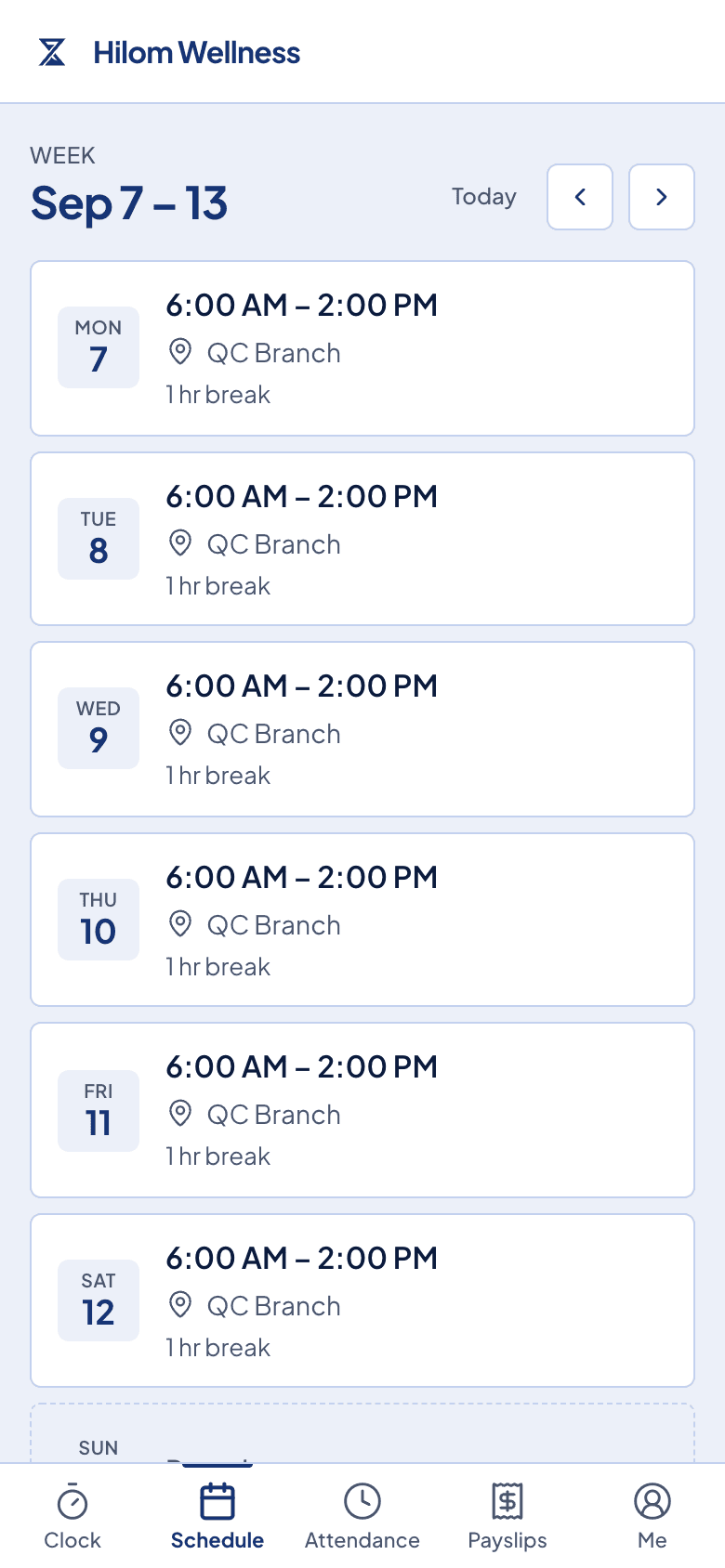
Timekeep gives admins month, week, day, and detail schedule views. Employees can also check their own schedule in the portal, so they do not need to ask the owner every time.
Connect schedules to attendance rules
Your schedule policy should connect directly to attendance rules.
Define:
- When an employee is considered late
- Whether a grace period applies
- How undertime is handled
- What counts as overtime
- Whether overtime must be approved
- How breaks and overbreaks are treated
- How night shifts are assigned to work dates
This matters because schedules are not just calendars. They are the basis for payroll calculations like late deductions, undertime, overtime, overbreaks, and night differential.
Timekeep uses schedules when computing those attendance outcomes, so the schedule should reflect the actual approved plan.
Handle overtime before payroll
Overtime should not be a surprise on payday.
Your policy should state when overtime is allowed, who can approve it, and whether employees must request approval before or after the extra work.
For example:
- Overtime must be approved by the supervisor.
- Unapproved late clock-outs are reviewed but not automatically paid as overtime.
- Emergency overtime can be approved after the shift with a manager note.
- Approved overtime appears in payroll.
This gives employees a fair process and gives the business control over labor cost.
Include leave coverage rules
Leaves and schedules affect each other.
Your policy should define:
- How early employees should file leave
- Who approves leave requests
- Whether leave blocks the whole work date
- How schedule coverage is reassigned
- What happens if leave is filed after the schedule is published
In Timekeep, approved leave appears in scheduling and payroll workflows. That helps the business distinguish an approved paid leave from an unexplained absence.
Keep schedule history visible
Schedule disputes often sound like this: "But that was not my schedule."
Visible schedule history helps. If a schedule was moved, edited, or deleted, the business should be able to see what changed and when. This is especially important for payroll-sensitive changes made after attendance was already recorded.
Timekeep includes schedule audit logs and visible edit history, so teams can review changes instead of relying on memory.
A simple policy template
Here is a practical starting point:
- Work schedules are assigned in Timekeep and published before the workweek starts.
- Employees are responsible for checking their schedule in the portal.
- Schedule changes must be approved by a supervisor before they take effect.
- Rest day changes and shift swaps require approval.
- Late arrivals and undertime are computed against the approved schedule.
- Overtime must be reviewed and approved before payroll.
- Approved leave blocks the scheduled work date and is reflected in payroll.
- Payroll follows the approved schedule and attendance records in Timekeep.
Adjust this to your actual business. The point is not to sound formal. The point is to make the rule clear before there is a dispute.
Better schedules make better payroll
Scheduling is not separate from payroll. It decides when someone should work, whether they were late, whether they had undertime, whether overtime applies, and whether rest day or holiday premiums need review.
For a small business, a fair schedule policy does not need to be complicated. It just needs to be written down, visible to the team, and reflected in the system used for attendance and payroll.
Try Timekeep free for 30 days at timekeep.ph.
Quick answers
Frequently asked questions
Why does a small business need a scheduling policy?
A scheduling policy prevents confusion about start times, rest days, schedule changes, overtime approvals, leave coverage, and how attendance will be computed for payroll.
What should be included in a work schedule policy?
Include shift start and end times, break rules, rest days, late and undertime treatment, schedule-change notice, overtime approval, leave filing, and who can approve changes.
Can Timekeep track schedules and late arrivals?
Yes. Timekeep supports shift templates, employee schedules, calendar views, schedule imports, and schedule-aware attendance calculations for late, undertime, overtime, overbreak, and night differential.
Should employees see their schedules in advance?
Yes. Publishing schedules in advance reduces missed shifts and disputes. In Timekeep, employees can view their schedules from the employee portal.