
Payroll Cutoffs and Pay Schedules in the Philippines
Per cutoff means per pay period, usually the 1st–15th and 16th–end of month. A table shows which dates 15 & 30, 10 & 25 and 5 & 20 paydays cover.
Mar 31, 2026 / 6 min read
What “per cutoff” means
A cutoff is one payroll period: the range of dates whose work is paid together. Per cutoff means for each of those periods. Most Philippine businesses have two cutoffs a month, the 1st to 15th and the 16th to the end of the month, so pay quoted “per cutoff” is roughly half the monthly amount. The cutoff date is the last day counted in the period; payday comes a few days after it.
To see what a salary looks like after SSS, PhilHealth, Pag-IBIG and tax, try the take-home pay calculator.
Why cutoff structure matters
It's the 5th of the month. Your staff are expecting their pay today, but you're still sorting out attendance from the last two weeks. The cutoff ended on the 30th, and somehow five days wasn't enough buffer. You're rushing through numbers, second-guessing deductions, wondering if there's a better way to structure this.
There is. Most cutoff headaches come from the initial setup, not from payroll itself. Get the schedule right once and every period after that runs smoother.
Cutoffs aren't just calendar dates. They determine how daily pay is computed, when overtime and holiday premiums land, and which payroll period absorbs government deductions. A misaligned cutoff means computation errors that compound every period.
For a business with 10 to 30 staff, even a small error per person per cutoff adds up to real money by year-end. The structure you choose on day one follows you through every payroll run.
The standard semi-monthly setup
Almost every Philippine business pays semi-monthly, meaning two payroll periods per month. The Labor Code requires wages be paid at least twice a month, with intervals not exceeding sixteen days.
First and sixteenth
The most common structure splits the month at the midpoint. First cutoff covers the 1st through the 15th. Second cutoff covers the 16th through the end of the month (28th, 29th, 30th, or 31st depending on the month).
This is the simplest to understand and the easiest to explain to your staff. Pick this unless you have a specific reason not to.
Shifted cutoffs
Some businesses shift the periods, running the 16th to end-of-month as the first cutoff and the 1st to 15th as the second. This can align with other monthly cycles but adds confusion. Most owners who try this switch back within a year.
Setting your payday
Payday is not the cutoff end date. You need a processing gap between when the cutoff closes and when pay is released. This is the time you use to review attendance, verify computations, and catch errors before money goes out.
| Cutoff period | Common payday |
|---|---|
| 1st - 15th | 20th or 25th |
| 16th - end of month | 5th or 10th of next month |
A 5-day gap works if your attendance tracking is already connected to payroll. A 10-day gap gives you room for manual review and corrections. Either way, make sure your staff know exactly when to expect their pay.
15 and 30, 10 and 25, 5 and 20: what each schedule means
When people say “15 and 30” or “10 and 25”, they are naming the two paydays, not the cutoff dates. Each pair implies a different cutoff and a different processing gap. These are common setups, not legal requirements. The only rule is the Labor Code's: pay at least twice a month, no more than sixteen days apart.
| Paydays | Cutoff paid on the first payday | Cutoff paid on the second payday | Processing gap |
|---|---|---|---|
| 15th and 30th | 26th of last month to the 10th | 11th to the 25th | 5 days |
| 10th and 25th | 16th to end of last month | 1st to the 15th | 10 days |
| 5th and 20th | 16th to end of last month | 1st to the 15th | 5 days |
15 and 30 keeps paydays on the familiar dates, so the cutoff has to close early. A business that pays on the 15th for the 1st to the 15th has no time to review attendance. Most move the cutoff back five days instead.
10 and 25 gives the most review time and suits owners who still check attendance by hand.
5 and 20 is the same calendar halves with a shorter gap. It works when attendance already flows into payroll.
Whatever pair you choose, write the cutoff dates on the payslip so staff can see which days each payday covers.
Handling mid-cutoff hires
When a new team member starts on the 10th and your cutoff runs from the 1st to 15th, they get paid for the days they actually worked. Divide the monthly salary by the applicable divisor (commonly 313 or 261 days depending on whether rest days are included), then multiply by days worked.
This is cleaner than pro-rating and stays consistent with how you'd handle absences in any other period.
For government contributions, the person is typically covered for the full month even if they started mid-period. Deduct the full monthly SSS, PhilHealth, and Pag-IBIG from their remaining cutoffs. Coordinate carefully so you don't double-deduct or skip a month.
Where government deductions go
Every month, SSS, PhilHealth, and Pag-IBIG contributions need to come out of each team member's pay. The question is which cutoff.
First cutoff only
All government deductions come out of the first payroll run. Simple to manage. The trade-off is that your staff's first-half net pay is noticeably lower.
Second cutoff only
Same idea, reversed. Deductions hit the second payroll run. Some owners prefer this because it keeps the "beginning of month" paycheck higher.
Split across both
Half the deductions from each cutoff. This smooths out net pay and feels fairer to your staff. It adds a small amount of complexity to your computation, but most payroll systems handle this automatically.
There's no legal requirement dictating which approach to use. What matters is consistency. Pick one and document it so your team knows what to expect every period.
BIR withholding tax works differently. Since the correct tax depends on total monthly compensation, some businesses compute a preliminary amount on the first cutoff and adjust on the second. Others apply the full computation only on the second cutoff.
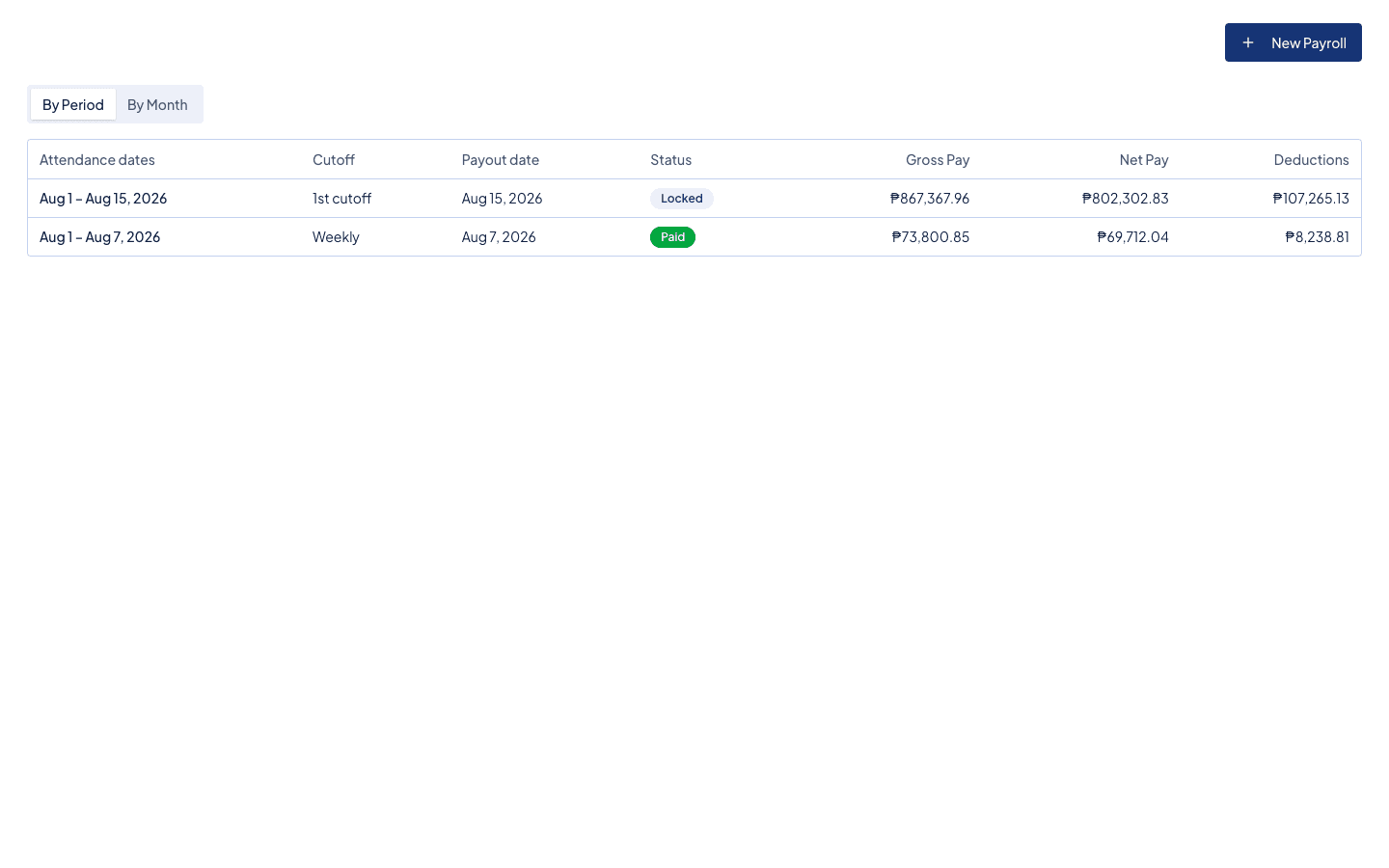
How Timekeep handles payroll periods
Timekeep's timekeeping and payroll software doesn't lock you into a fixed cutoff schedule. When you create a payroll, you pick the cutoff label (1st or 2nd) and set any start and end date you want. Timekeep pulls in all attendance records within that date range, computes pay, deductions, and contributions, and generates payslips. If you need to adjust a period or run payroll for a custom range, you just change the dates.
Set it once, run it every period
The best payroll schedule is the one you configure once and never think about again. Define your cutoffs, set your paydays with enough processing room, decide where deductions land, and let the system handle the repetition. Your Tuesday nights back.
Try it free for 30 days at timekeep.ph. No credit card required.
Quick answers
Frequently asked questions
- What does “per cutoff” mean?
- A cutoff is one payroll period: the range of dates whose work is paid together. “Per cutoff” means for each of those periods. Most Philippine businesses have two cutoffs a month, the 1st to 15th and the 16th to the end of the month, so a ₱10,000 per cutoff salary is about ₱20,000 a month.
- How many cutoffs are there in a month?
- Usually two. The Labor Code requires wages to be paid at least twice a month, at intervals of no more than sixteen days, so most businesses use semi-monthly cutoffs.
- What does a 10 and 25 cutoff mean?
- It means paydays fall on the 10th and the 25th. In a common setup, the 25th pays for the 1st to the 15th and the 10th pays for the 16th to the end of the previous month, which leaves ten days to review attendance.
- Is the cutoff date the same as payday?
- No. The cutoff is the last day of work counted in the period. Payday comes a few days later, commonly the 20th or 25th for the 1st to 15th cutoff, and the 5th or 10th of the next month for the second cutoff.
Make the next payday the easy one.
Set up in an afternoon, run your first cutoff, and see every peso explained on the payslip.
30 days free, no credit card. Then ₱999 a month for up to 10 employees.