
Manage your subscription and seats
Check your plan on Billing, pay for a month or a year through PayMongo, add seats when you hire, and know what happens if the subscription lapses.
Updated Oct 9, 2026
Every new business starts with a 30-day free trial. After that, Timekeep has one plan, paid monthly or yearly:
- Monthly: ₱999 per month, with 10 seats included. Each extra seat is ₱49 per month.
- Yearly: ₱9,990 per year, with 10 seats included. Each extra seat is ₱490 per year.
A seat is room for one active employee on Staff. Deactivated staff do not use a seat, and neither do the users you invite to the dashboard. During the trial there is no seat limit.
Before you start
Only the owner can open Billing and pay. Other roles do not see it in the sidebar.
Steps
Go to Billing. The Current Plan card shows your status, such as Trial or Active. It also shows Employees as active employees out of seats, the date your trial or term ends, and Days Remaining.
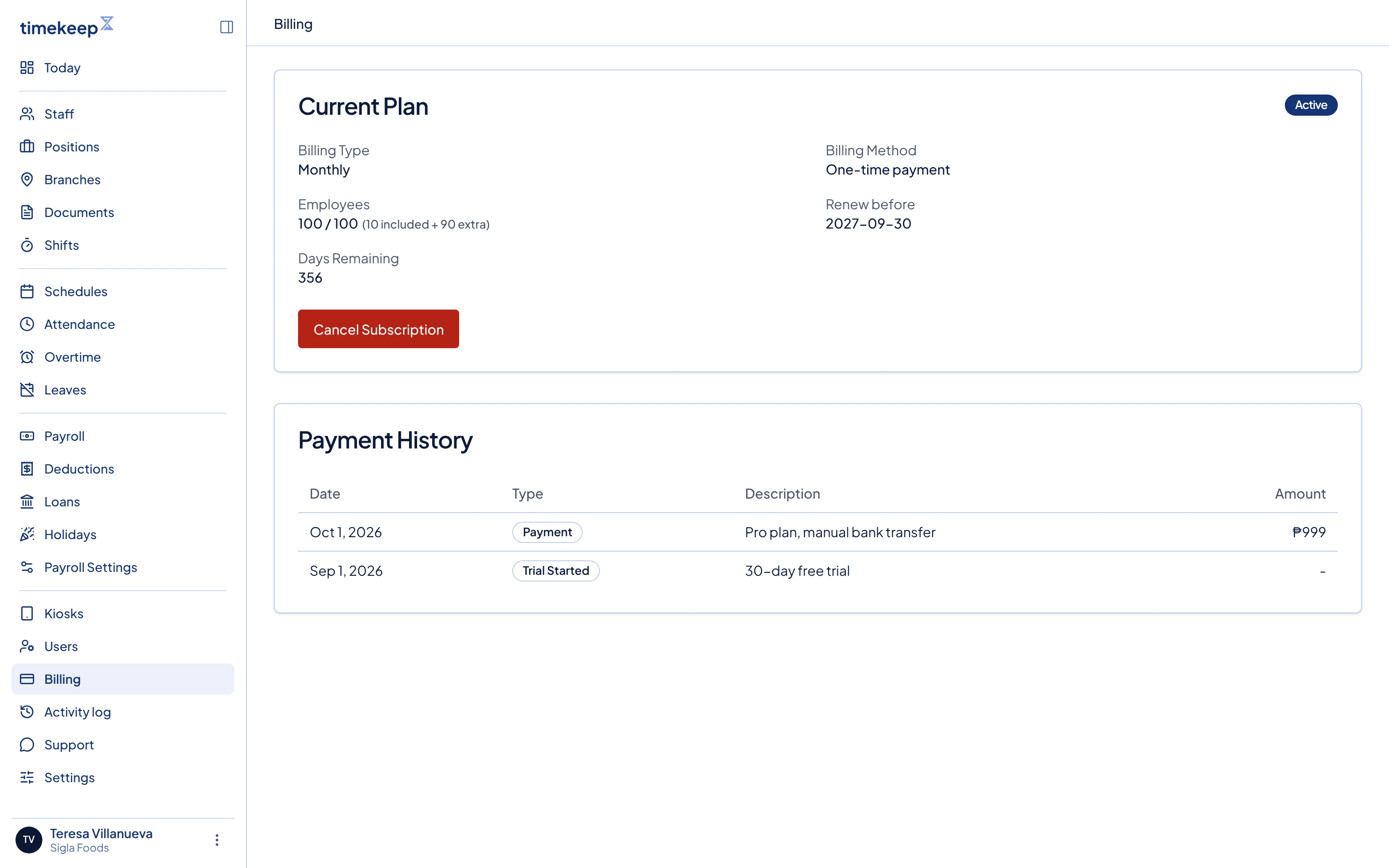
The Billing page. Current Plan is at the top and Payment History is below it. During the trial, click Subscribe Now. To renew a paid plan, click Renew Now in the yellow bar at the top of the dashboard. The bar shows in the last 7 days of your term. If you scheduled a cancellation, the bar reads Subscribe now instead of Renew Now.
Choose Monthly or Yearly. The total counts your active employees today, so 14 employees on Monthly cost ₱999 plus 4 extra seats at ₱49, which is ₱1,195.
Leave Have a promo code? closed unless the Timekeep team gave you a code.
Click Subscribe Now or Renew Now. Timekeep opens PayMongo, where you pay.
What happens next
Each payment covers one month or one year. Timekeep never charges your card on its own, so you pay again at the end of each term. If you renew in the last 7 days of your term, the new term starts when the current one ends, so you lose no days. Your seats are set to your active employee count when you pay, with a minimum of 10.
Payment History on Billing lists each payment, the trial, and any cancellation.
Add more seats
When every seat is in use, Add Employee on Staff opens Add more seats. Choose the number of Additional seats and click the button with the total, such as Pay ₱98 for 2 monthly seats. This is a one-time charge for the rest of your current term, at the full seat price. It is not reduced for the days you have already used. At your next renewal, the price follows your active employee count. A manager sees Employee limit reached instead and must ask the owner to add seats.
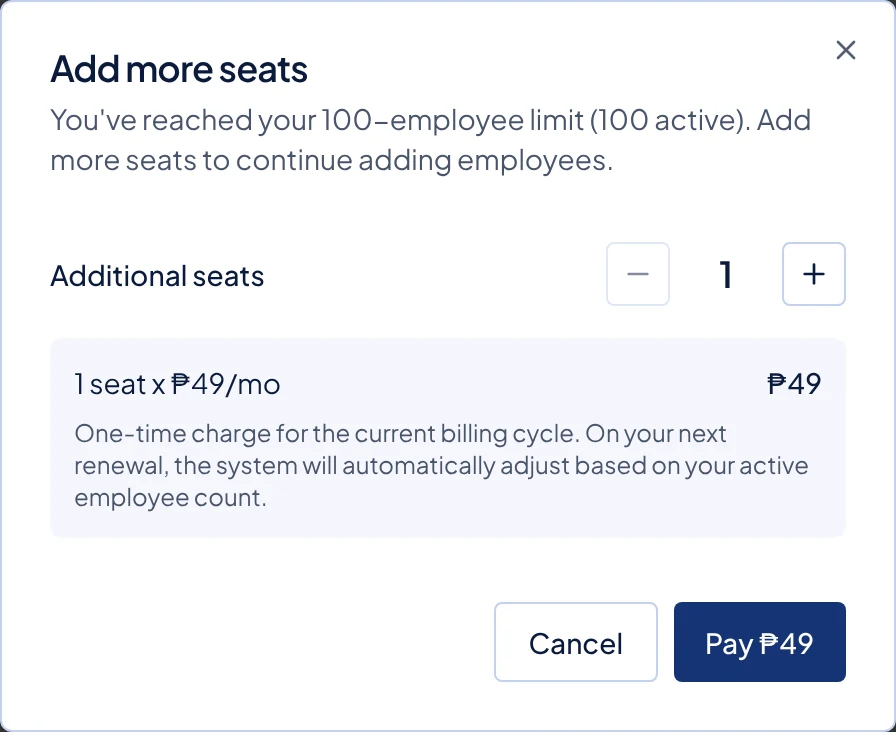
You can also free a seat by deactivating someone who has left.
Cancel
On an active plan, click Cancel Subscription, then Yes, Cancel. You keep access until the end of the term, and the status shows Scheduled to end. To change your mind, click Undo Cancellation, then Keep Subscription Active.
When the subscription lapses
When the trial or term ends without payment, the dashboard locks. The owner is sent to the checkout page to pay. Everyone else sees Billing needs attention until the owner pays. Kiosks stop taking punches and show Kiosk Unavailable.
Common problems
- I paid, but the dashboard still asks me to pay. PayMongo can take a moment to confirm the payment. Wait a minute, then reload the page.
- I cannot find a Renew Now button on Billing. An active plan can be renewed only in its last 7 days. Use Renew Now in the yellow bar at the top of the dashboard. If you scheduled a cancellation, the bar reads Subscribe now instead.
- I did not get the trial or renewal reminder email. Timekeep sends these to the Business email in Settings. Check that it is filled in and correct.