
Pause, cancel or delete a loan
Follow a loan's balance, stop payroll from taking payments for a while, or end the loan.
Updated Sep 29, 2026
Before you start
You must be an owner or manager. Supervisors and bookkeepers can view a loan, but the pause, cancel, and delete controls are hidden from them.
Steps
Go to Loans. Each row shows the Remaining balance, the Progress, and a Status of active, paused, completed, or cancelled.
Open the menu at the end of the loan's row.
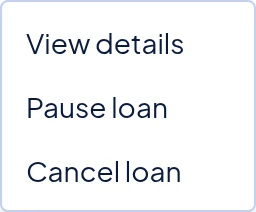
The menu for an active loan offers View details, Pause loan and Cancel loan. Click View details to check the loan first. Payment History lists each payment made through a payroll marked paid. Projected Schedule shows what was planned from the original terms, so it does not change when you pause.
Back in the menu, choose what you need:
- Pause loan skips the loan on every payroll until you click Resume loan. A skipped payment is not added back later.
- Cancel loan stops all future payments. You cannot undo it.
- Delete loan removes the loan for good. It appears only on a cancelled loan that has no payments recorded.
Confirm in the box that opens.
You can also use the buttons at the top of the details page. They do the same things.
What happens next
Payroll checks each loan's status when you click Run Payroll. A paused or cancelled loan adds nothing to the payslip.
Payments already recorded stay in Payment History, and the balance stays where it was. A completed loan needs no action, because payroll stopped taking payments when the balance reached zero.
Common problems
- I cannot find Delete loan. Only a cancelled loan with no payments recorded can be deleted. If payroll has already taken a payment, keep it cancelled as a record.
- I entered a wrong amount. A loan cannot be edited. If no payment is recorded, cancel it, delete it, and add it again with Add an employee loan. If payments are recorded, cancel it and add a new loan for the balance left.
- I paused a loan, but a payslip made earlier still shows the payment. Payslips already made keep their amounts. If the payroll still shows Draft, follow Rerun a draft payroll.