
Pay 13th month pay
Work out each employee's 13th month pay from a year of payroll, then add it to their payslip in a payroll run.
Updated Oct 9, 2026
13th month pay is a yearly benefit equal to one-twelfth of the basic salary an employee earned in the calendar year. Timekeep does not calculate it. You work out the amount, then add it to each payslip.
Before you start
- You must be an owner, manager or supervisor. The payroll run must show Draft or Locked and already have payslips.
- Under DOLE rules, rank-and-file employees who worked at least one month in the year are covered, whatever their employment status or how they are paid. Employees paid purely on commission, boundary or task basis are generally not covered, unless paid by piece rate. Managerial employees, who can hire, discipline or set company policy, are not covered. Ask your accountant if you are unsure about someone, especially a managerial employee.
- Pay it by December 24. You may pay half before the school year opens and the rest by December 24. Start early, so a payroll run is open before December 24 to add it to.
Steps
Go to Payroll, click the By Month tab, and download the CSV for each month of the year. See Download payslips and reports. Each month's file adds up every run that month that has payslips, drafts included, grouped by the run's first date. Check that no draft or duplicate run is in the totals.
For each employee, add up Basic Pay for the year. It already includes paid leave, so do not add Leave Pay again. Subtract Late Ded, UT Ded, Overbreak Ded and Absent Ded, because that is pay the employee did not earn. Leave out OT Pay, Holiday Pay, NSD Pay and allowances, unless your company counts them as basic salary. Ask your accountant how to treat holiday pay for days not worked.
Divide the total by 12. For example, ₱186,000 earned in the year gives ₱15,500. For someone who joined or left during the year, still divide by 12, not by the months they worked. An employee who has left is owed a pro-rated 13th month pay, which is paid with their final pay.
Choose a payroll run whose Payout Date is on or before December 24. If you pay before your last December cutoff is run, that cutoff's basic pay is not in the CSVs yet. Ask your accountant whether to include an estimate or settle the difference later. On Payroll, open the By Period tab and click the payroll run. Under Payroll Entries, click the employee's row.
Click Add Earning beside Additional Earnings, and choose 13th Month Pay as the Earning Type.
In Description (optional), write the period it covers. Enter the Amount, then click Add Earning.
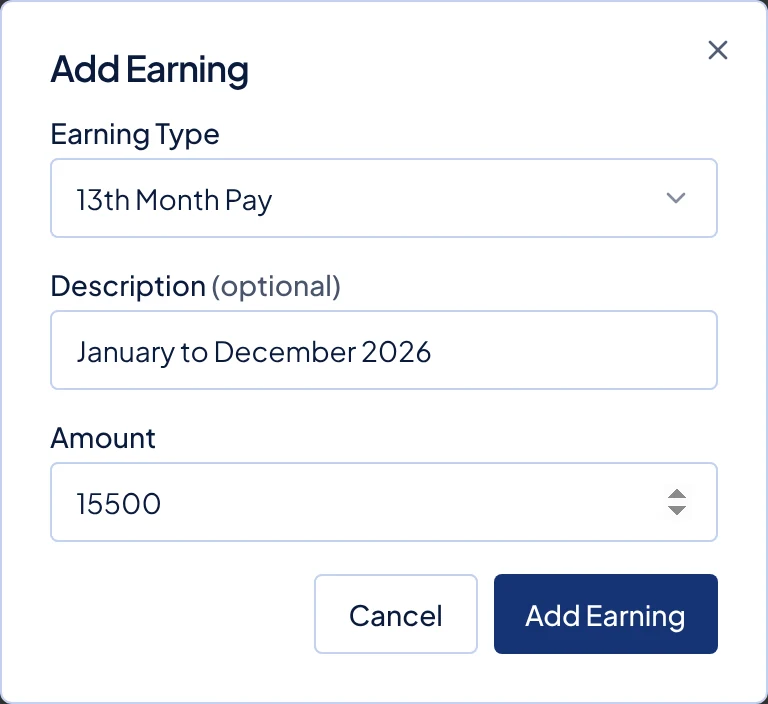
The Add Earning dialog with 13th Month Pay selected and ₱15,500 for January to December 2026.
Repeat steps 4 to 6 for each employee.
What happens next
The amount is listed under Additional Earnings, and Net Pay goes up by the same amount. It works like any one-off earning. In the employee portal the amount appears inside Other Earnings. The downloaded PDF payslip lists it as 13th Month Pay.
Timekeep adds it after tax. No withholding tax, SSS, PhilHealth or Pag-IBIG is taken from it. 13th month pay and other bonuses are not taxed up to a combined ₱90,000 for each employee in a year, but Timekeep does not track that limit. If an employee goes over it, ask your accountant how to tax the excess.
Common problems
- Add Earning is greyed out. The run is already paid. Add the 13th month pay to the next payroll run instead.
- Basic Pay is higher than the daily rate on some days. Work on a rest day is counted in Basic Pay with its rest day premium. DOLE's guidelines exclude premium pay from basic salary unless your policy treats it as basic. Ask your accountant whether to take the premium out.