
How overtime and night differential are paid
See when extra hours count as overtime, what overtime and night work pay, and where both appear on the payslip.
Updated Oct 2, 2026
Before you start
Overtime is time worked past a full day on a scheduled workday. Rest days and days with no schedule have none.
Where overtime starts depends on A full day is, in the General card of Payroll Settings. An employee's own Shift Mode, under Settings on their page in Staff, overrides it for that person.
- 8 hours (DOLE) counts time past 8 hours from the scheduled start, minus the break. If the schedule sets break times, that whole break is taken out even when the employee does not clock it. If it sets only a break length, the break the employee clocked is taken out. Arriving late does not shorten this count. Work counts from clock-in instead when the schedule has Allow early clock-in on.
- Scheduled hours counts time after the scheduled end.
Payroll pays only approved overtime. On Attendance, open the menu at the end of the row and click Approve OT. If your staff file requests in the portal, see Approve or decline overtime requests.
Steps
Go to Payroll Settings and find the Overtime card. Only the owner can open this page.
Standard day for OT pay divides a daily rate to get the overtime hourly rate. It is 8 by default. A higher number lowers overtime pay for daily and monthly staff. It does not change when overtime starts, and it does not affect hourly staff.
Pay extra for overtime pays 125% for overtime on an ordinary workday. Off, it pays 100%.
Staff can request overtime lets employees ask for overtime in the portal.
Don't let short breaks add OT stops a short or skipped break from becoming overtime in 8 hours (DOLE) mode. Timekeep then takes out at least the scheduled break. It matters only for schedules that set a break length without break times.
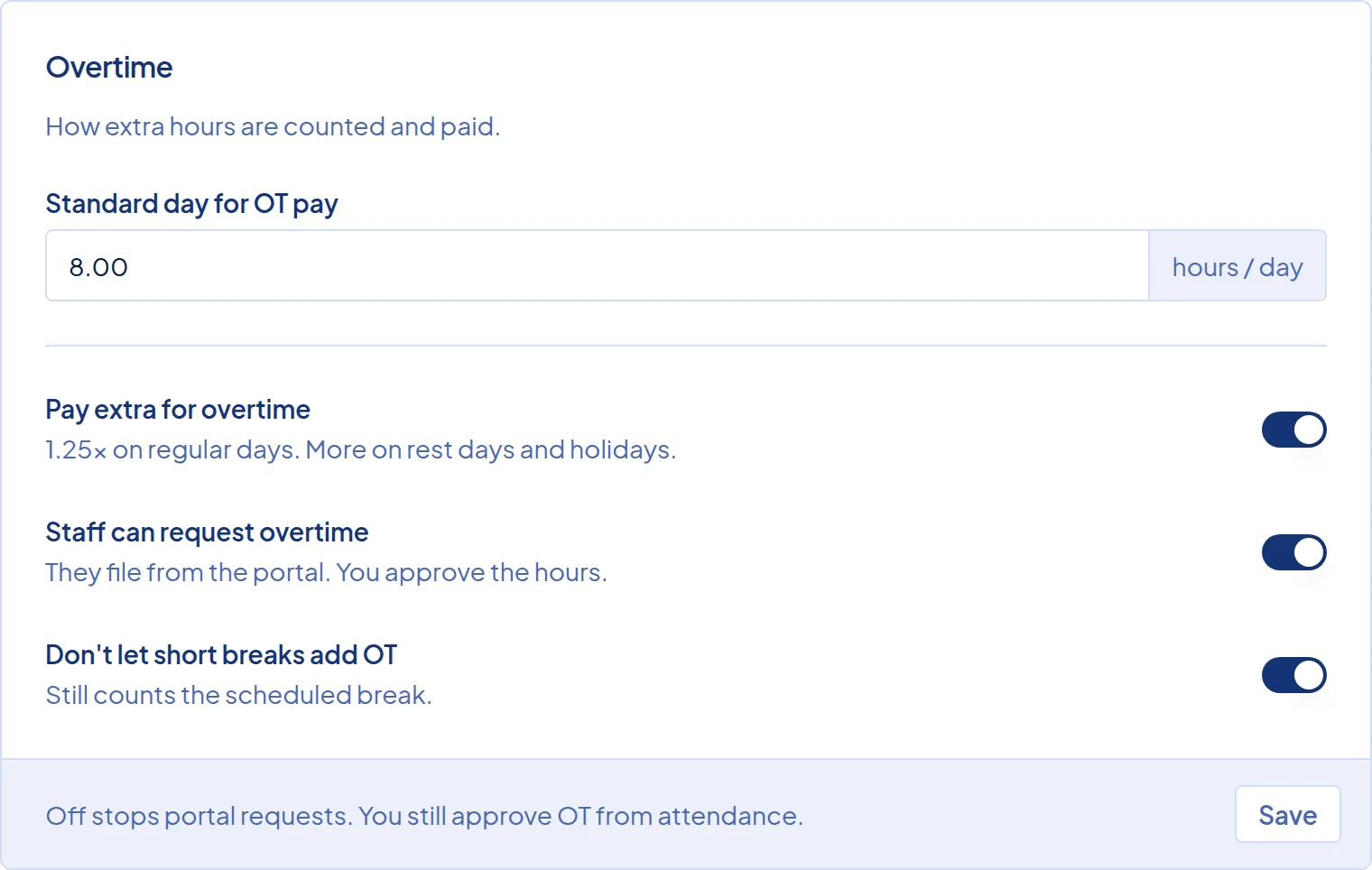
The Overtime card in Payroll Settings, with Standard day for OT pay set to 8 hours. Click Save.
Overtime minutes are counted when attendance is saved. To apply a new A full day is or break setting to days already recorded, follow Recalculate attendance.
What happens next
Overtime pays these rates per hour:
- Ordinary workday: 125%, or 100% with Pay extra for overtime off.
- Special holiday: 169%.
- Regular holiday: 260%.
Holiday rates ignore that switch but need the employee's Holiday Pay switch on. See How a holiday shows up in pay.
Night differential, or NSD, adds 10% of the hourly pay for paid work between 10:00 PM and 6:00 AM. Change those hours with NSD Start and NSD End on the schedule. Changing them on a shift affects only schedules made from it afterwards. Night hours inside approved overtime earn 10% of the overtime rate. Breaks, late time and unapproved overtime earn none. The employee's Night Shift Differential switch must be on.
Daily and Monthly staff are paid from their daily rate, and Hourly staff from their hourly rate. Fixed Semi-Monthly staff get no overtime and no night differential.
For example, Liza earns ₱800 a day. Her schedule is 2:00 PM to 11:00 PM, with a one-hour break at 6:00 PM that she clocks. She clocks out at 1:00 AM, and her 2 hours of overtime are approved.
- Hourly rate: ₱800 ÷ 8 = ₱100. Overtime rate: ₱100 × 125% = ₱125.
- Overtime: 2 × ₱125 = ₱250.
- Night differential: 10 to 11 PM pays 1 × ₱100 × 10% = ₱10. 11 PM to 1 AM pays 2 × ₱125 × 10% = ₱25. That is ₱35.
Her day pays ₱800 + ₱250 + ₱35 = ₱1,085.
On the payslip, the Earnings card shows "Overtime (2.00 hrs)" and "Night Shift Diff (180 min)". The employee portal calls them "Overtime Pay" and "Night Shift Differential".
Common problems
- Overtime is missing from the payslip. It was probably approved after the payroll ran, or a recalculation changed the minutes and removed the approval. Approve it again on Attendance. If the run is Draft, rerun it. If it is Locked, click Unlock first. Staff with Full Day Clock In on never get overtime.
- I cannot approve overtime on a rest day. Approve OT does not appear on a day marked Rest day (off day), because Timekeep does not count overtime on rest days. Daily and monthly staff get one day at the rest-day rate, however long they work. To pay the extra hours, use Add Earning on the payslip.
- The night differential looks too small. Check that the employee's Night Shift Differential switch is on. Then check NSD Start and NSD End on that day's schedule, and look for late time or unapproved overtime that night.